
Test Your CV with an ATS Parser Before You Apply
That "ATS-friendly" template you downloaded might not be as readable as you think. Many CV templates claim ATS compatibility, but when you actually run them through a parser, critical information (your name, email, work history) fails to extract correctly. The result: your application gets filtered out before a human ever sees it.
Why ATS-friendly templates are not enough
The term "ATS-friendly" has become a marketing label more than a technical guarantee. A template can look clean and professional while still using formatting that breaks automated parsing. Common culprits include:
- Text embedded in images or headers. Your name or contact details might render beautifully on screen but be invisible to a parser that cannot read image-based text.
- Multi-column layouts. ATS parsers read documents sequentially. Two-column designs often cause content from different sections to merge or appear out of order.
- Custom fonts and special characters. Decorative typography can interfere with character recognition, causing fields like phone numbers or email addresses to be misread.
According to research by Harvard Business School and Accenture, automated screening systems exclude over 27 million qualified workers in the US alone. Many of these rejections are not about qualifications. They are about formatting.
How ATS parsing actually works
ATS systems extract your information by matching text patterns against expected formats. Under the hood, they use pattern recognition similar to regular expressions:
| Field | What the parser looks for |
|---|---|
| Name | Text containing only letters, spaces, or periods |
Pattern matching xxx@xxx.xxx | |
| Phone | Digit sequences matching (xxx)-xxx-xxxx format |
| Location | City and state pattern like City, ST |
| Dates | Year patterns (19xx or 20xx), month names, or "Present" |
| Education | Keywords like "University," "College," "Bachelor," "Master" |
| Job titles | Keywords like "Engineer," "Analyst," "Manager," "Intern" |
If your CV's formatting prevents these patterns from matching (even if the information is visually present), the parser treats it as missing data. Your application then ranks lower or gets filtered entirely.
How to test with Hyred's ATS parser
Hyred's ATS Parser shows you exactly what an ATS can and cannot read from your CV:
- Go to Hyred ATS Parser and upload your CV as a PDF.
- Review the parsed results. The tool displays what it extracted for each field: name, email, phone, location, education, work experience, and skills.
- Identify gaps. Any field showing blank or incorrect data indicates a parsing failure: that information would likely be lost in a real ATS.
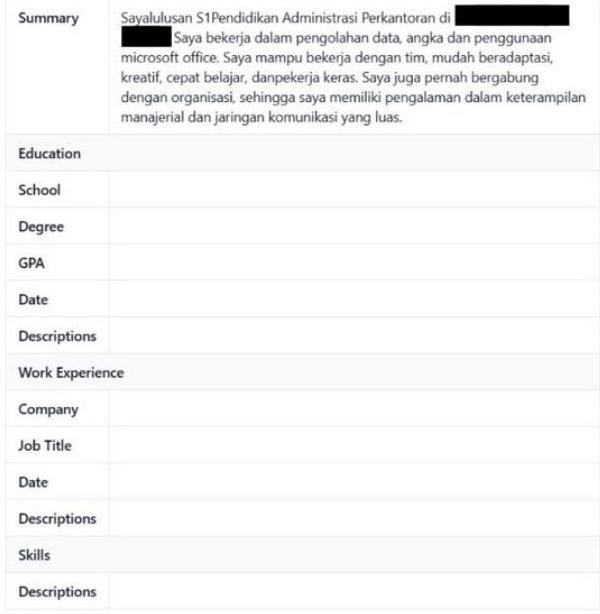
Pay special attention to whether your contact details, job titles, company names, and dates are all correctly detected. These are the fields recruiters and ATS algorithms rely on most heavily for screening and ranking.
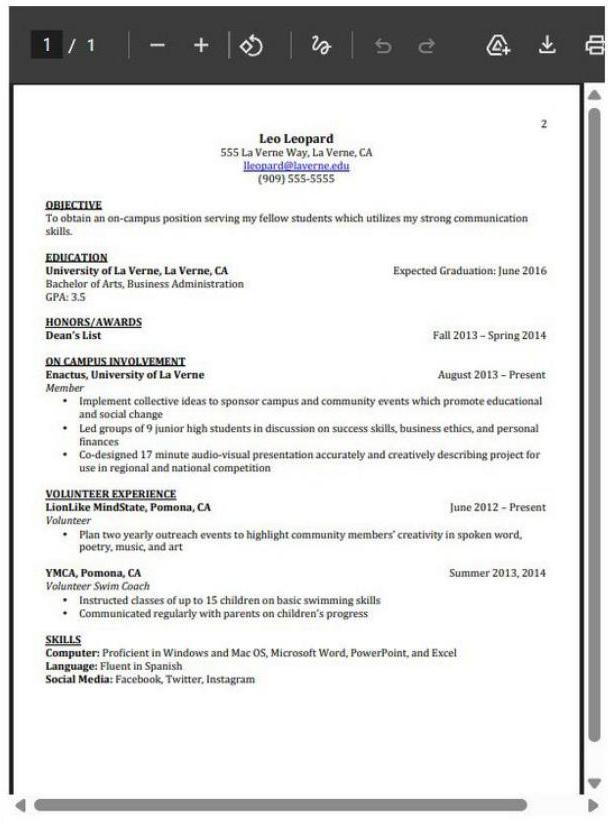
Here is an example of a well-structured CV that parses correctly. Notice the clean single-column layout, standard headings, and plain-text contact information:
Common parsing failures and fixes
Based on typical parser results, here are the most frequent issues and how to resolve them:
- Phone number not detected: Remove special formatting. Use a simple format like
(021) 555-1234or021-555-1234instead of embedding it in a graphic. - Email missing: Ensure your email is plain text in the document body, not placed inside a header, footer, or text box.
- Dates not recognized: Use standard date formats, such as
Jan 2024 - Presentor2023 - 2024. Avoid abbreviations likeQ1 2024or season-based formats that parsers may not recognize. - Job titles jumbled: Use clear visual hierarchy. Bold your job title and company name on separate lines rather than combining them in a single formatted block.
- Education not parsed: Include standard keywords. Write "Bachelor of Science" rather than just "B.Sc." to improve keyword matching.
From test results to action
If your parser test reveals extraction problems, the fix is usually simpler than you expect:
- Switch to a single-column layout. This is the single most impactful change for ATS readability.
- Move contact information to plain text in the document body, not in headers or graphics.
- Use standard section headings ("Experience," "Education," "Skills") instead of creative alternatives.
- Re-test after every change. Run your updated CV through Hyred's ATS Parser again to confirm each fix actually improved extraction.
For a comprehensive optimization checklist after testing, use our ATS-friendly CV checklist guide.
Get a detailed analysis of your CV's readability with a free CV review. Build a systematic job search with Career OS, and prepare for the interviews that follow with AI mock interviews.